


A multilingual WordPress site is two decisions wearing one hat: how the translated content will be stored and addressed, and who is going to write it. The plugin choice follows from those two answers, and picking a plugin first is how people end up rebuilding the site in a year.
Decision 1: what actually gets translated
Three different jobs get called “multilingual”, and they have different costs:
| Scope | What it covers | Ongoing cost |
|---|---|---|
| Interface only | Menus, buttons, form labels, theme strings | One-off, small |
| Content | Pages, posts, products, categories | Every new page, forever |
| Both | Interface and content, with a language switcher | Ongoing editorial work |
Most business sites need the third row and budget for the first. The trap is assuming machine translation removes the editorial cost: it converts the writing cost into a review cost, and reviewers are usually the people who already have no time.
Decision 2: how the URLs are structured
| Structure | Example | Trade-off |
|---|---|---|
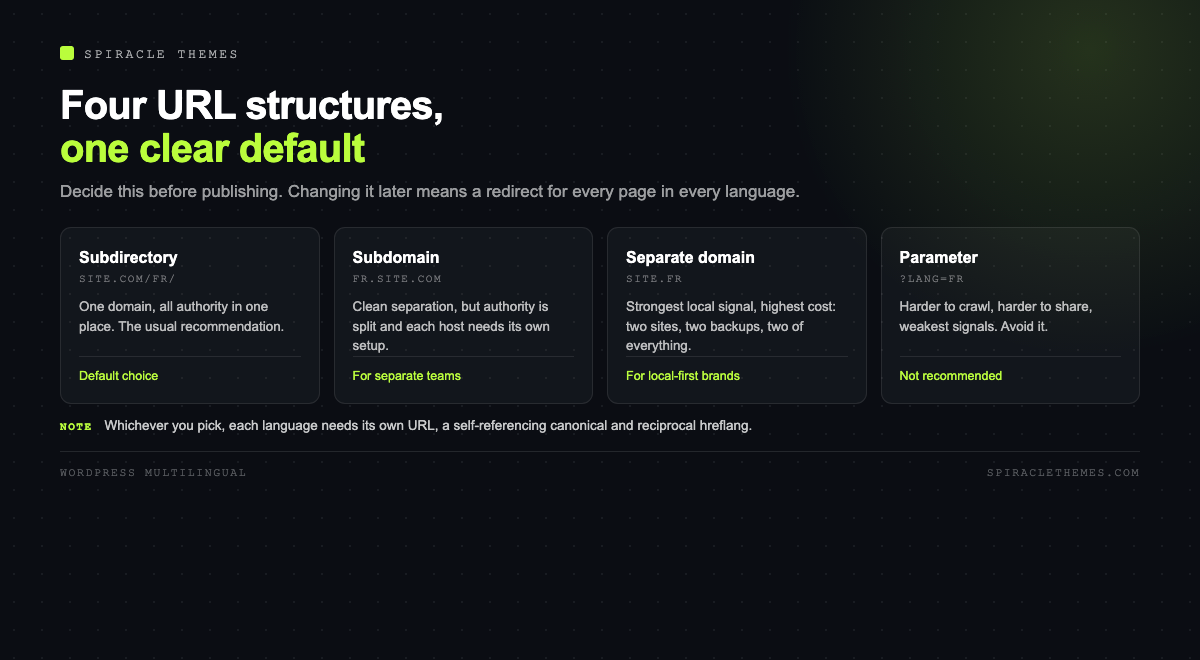
| Subdirectory | site.com/fr/ | Best default: one domain, all authority in one place |
| Subdomain | fr.site.com | Clean separation, authority split across hosts |
| Separate domain | site.fr | Strongest local signal, most expensive to maintain |
| Parameter | site.com/?lang=fr | Avoid: harder to crawl, harder to share, weaker signals |
Subdirectories are the usual recommendation because every page contributes to one domain. Whatever you choose, each language needs its own indexable URL, a self-referencing canonical, and hreflang tags pointing at the alternatives. Without hreflang, Google may treat the French and English pages as duplicates and pick one to show, usually the wrong one.
The plugins, as they stand
| Plugin | Installs | Rating | Model | Best for |
|---|---|---|---|---|
| Polylang | 900K+ | 94 (3,004) | Free core, paid Pro | Content translated by humans, full control of URLs |
| TranslatePress | 400K+ | 94 (1,667) | Free core, paid add-ons | Translating visually in the page, machine plus manual |
| Weglot | 50K+ | 96 (1,940) | SaaS subscription | Fast launch, translation handled as a service |
| WPML | not in the directory | n/a | Paid licence | WooCommerce and complex content models |
WPML is not listed in the WordPress.org directory, so there is no install count or rating to compare here; it is sold and supported commercially. The other three are all actively maintained and tested against current WordPress. The distinctions that matter in practice:
- Polylang stores each translation as a real post in its own language, which keeps the database clean and the URLs predictable. The editing workflow is “duplicate, then translate”.
- TranslatePress translates in the front end, which is the fastest way to see what a page looks like in another language, and it works with most page builders without per-builder support.
- Weglot is a subscription that proxies translated pages, so the initial effort is minutes rather than days, and the ongoing cost is a monthly fee that scales with words.
What multilingual actually costs to run
Every new page multiplies. A ten-page site in three languages is thirty pages to keep current, and the one that gets forgotten is always the pricing page. The practical mitigations:
- Translate the pages that earn: home, services, pricing, contact, and the top three posts by traffic.
- Leave the blog in one language until there is demand, and add hreflang only for pages that exist in both.
- Put a visible language switcher in the header, not in the footer.
- Set one language as default and keep the default URLs unprefixed, so existing links keep working.
Technical checks before launch
- Each language version returns its own URL, with a self-referencing canonical.
- hreflang tags list every language version, including the default, and reference each other reciprocally.
- The sitemap includes all languages, or you submit one sitemap per language.
- Untranslated pages either fall back to the default language or are excluded from that language’s sitemap, not left as empty shells.
- Slugs are translated where it helps a reader, and left alone where changing them would break links.
- The language switcher does not trap crawlers in a redirect loop, which happens when the plugin guesses language from the browser.
Machine translation, honestly
Automatic translation is good enough to make a page understandable and not yet good enough to make it persuasive. For product pages and legal text, publish only what a human has read. For support articles, machine translation with a feedback link is often a reasonable trade, because a slightly awkward answer is better than no answer.
The SEO consequence of skipping review is not a penalty; it is irrelevance. Pages that read as translated often rank for nothing, because the phrases people search are not the phrases a translation engine produces.
Translating a store without breaking checkout
WooCommerce is where multilingual setups usually fail, because the checkout is a sequence of templates, emails and tax rules rather than a set of pages. Four things to get right:
- Products are content, not interface. Each product needs its own translation with its own description, price display and stock text. Machine translation of a product name is usually worse than leaving the English name.
- Emails and invoices are per language. An order confirmation in English for a French customer is the most common complaint after launch, and it is configured in the email settings, not in the translation plugin.
- Tax and shipping rules rarely need translation, but the labels do. Check the checkout labels for every language, because they live in different template files and are missed more often than page copy.
- Payment gateways have their own strings. A gateway that only ships English strings will show English at the last step, which is the worst place to break the illusion.
Keeping the translations current
The maintenance cost is the part nobody budgets. A practical routine that keeps a multilingual site from drifting:
- Publish in the default language first, then translate, so the source of truth is always the original.
- Add the translated URL to the same editorial checklist as the featured image and the meta description.
- Review the top five pages by traffic in each language once a quarter, because prices and offers change faster than the rest of the content.
- Watch for orphan translations: pages that exist in one language and were deleted in the other, which produce soft 404s in the sitemap.
The sites that work are the ones where the translation is a step in the publishing process, not a project that happened once in 2023.
Hreflang mistakes that quietly cost traffic
Hreflang is the tag that tells Google two pages are translations of each other rather than duplicates. It is small, easy to get wrong, and mostly invisible until rankings flatten. The four failures that recur:
| Mistake | What happens | Check |
|---|---|---|
| Missing self-reference | The tag set is ignored entirely | Every page lists itself plus the alternates |
| One-way links | Only some pairs are treated as alternates | Each page points back to every other |
| Wrong region codes | fr-FR shown to all French speakers | Use a language-only code when the region is irrelevant |
| Tags on non-canonical URLs | Signals point at pages Google will not index | Hreflang only on the canonical version |
The self-reference is the one people skip, and the most common result is a site where the English pages rank and the translations are treated as near-duplicates. It takes ten minutes to verify in the page source with a search for hreflang, and it is worth doing before launch rather than after a quarter of flat traffic.
Machine or human, per page type
The decision is not ideological, it is per page. A workable split for most businesses:
- Home, services, pricing: human translation, reviewed by someone who sells in that language. These pages carry the commercial argument and every awkward sentence costs money.
- Blog articles: machine first, human edit of the intro and conclusion, which is where most readers decide whether to continue.
- Legal and policy pages: human, and reviewed locally. A translated privacy policy is a legal document, not a marketing one.
- Product descriptions: human for the top twenty products, machine for the long tail, with a feedback link on every page.
The cost of getting this wrong is not a penalty, it is silence: pages that read like translations rank for nothing because they do not contain the phrases people actually search.
Related reading: a second language multiplies the pages you have to keep fast and readable, which is why mobile performance and bounce rate matter more, not less, once the site is multilingual.
FAQ
Do I need a plugin at all?
For two or three static pages, you could run separate installs. Once content changes regularly, a plugin keeps URLs, menus, hreflang and the switcher consistent, which is worth the complexity.
Will a multilingual site be slower?
Not meaningfully, if the plugin stores translations as normal content. Proxy-based services add a network hop, and page-builder-heavy sites see more impact than the multilingual layer itself.
Can I translate WooCommerce products with a free plugin?
Polylang and TranslatePress both have free tiers that handle products, with limitations around some extensions and checkout strings. Complex stores usually end up on a paid tier for exactly that reason.
Does hreflang guarantee the right page shows?
No. It is a hint, not a directive. It helps Google understand that the pages are alternates rather than duplicates, and it is worth implementing correctly, but ranking still depends on each page’s content and links.
What happens to my existing URLs when I add a second language?
Keep the default language unprefixed and they stay as they are. If you switch to prefixed URLs after launch, every existing link needs a redirect, so decide before you publish rather than after.
Choose the URL structure first, decide who writes the translations second, and let those two answers pick the plugin. The technical part is a week of work; the editorial part is the actual project.