

Starting a blog on WordPress takes about ninety minutes, and most of that is not writing. It is six settings, one page assignment and a decision about how you will organise posts. Get those right on day one and the blog stays manageable at a hundred posts. Get them wrong and you will be reorganising URLs and categories in month six, which is the only part of blogging that is genuinely painful.
This guide is the sequence I would follow on a fresh install: what to set up, in what order, and what actually matters for search versus what the internet repeats about search.
What you need before you start
- A domain and hosting. Roughly US$60–150 a year for a blog. WordPress.org software is free; the hosting is not. If the two bills confuse you, they are explained in domains and hosting.
- WordPress installed. Most hosts do this in one click. The current release is 7.1.4, and the host should be running PHP 8.3 or newer.
- A theme. A free block theme is enough to start. You can change it later without losing a single post, because content lives in the database, not the theme.
- Ninety minutes. Not a weekend. Blogs die from over-planning far more often than from under-planning.
Step 1: the six settings that make WordPress a blog
Out of the box, WordPress shows your latest posts on the homepage. That is fine for a pure blog and wrong the moment you want an About page or a sales page. Decide now, because it changes your menus and your URLs.
Settings → Reading
Two options: “Your latest posts” or “A static page”. If you choose static, WordPress asks for two pages — a homepage and a posts page. Create a page called Blog first (Pages → Add New, publish it empty), then assign it here. That page becomes the archive of your posts; you do not write content into it.
The same screen controls “Blog pages show at most” — how many posts appear per page. Ten is a sensible default. Lower it to five if your posts are long and image-heavy.
Settings → Permalinks
Choose “Post name”. This produces /your-post-title/ instead of /?p=123. Google’s own SEO guidance recommends descriptive URLs, and notes that parts of the URL can appear as breadcrumbs in search results — which is free context in the SERP.
Set this before you publish anything. Changing it later is possible but every old link needs a redirect.
Settings → General
Site title and tagline. The tagline appears in some themes under the site name and in your RSS feed; make it a description of the blog, not a slogan.
Settings → Discussion
Comments on or off is a real decision, not a default. For a new blog, comments on with moderation is the better growth choice — but turn on “Comment must be manually approved” before you publish, or the first thing your readers see will be spam.
Users → Profile
Set a display name and an author bio. The author box is one of the few places a blog can demonstrate who is writing, and “admin” as an author name undermines every post on the site.
Settings → Reading, again: search visibility
Confirm “Discourage search engines from indexing this site” is not ticked. It is easy to tick while building and forget. A site with that box ticked looks completely normal in a browser and gets zero traffic for months.
Step 2: categories and tags, decided once
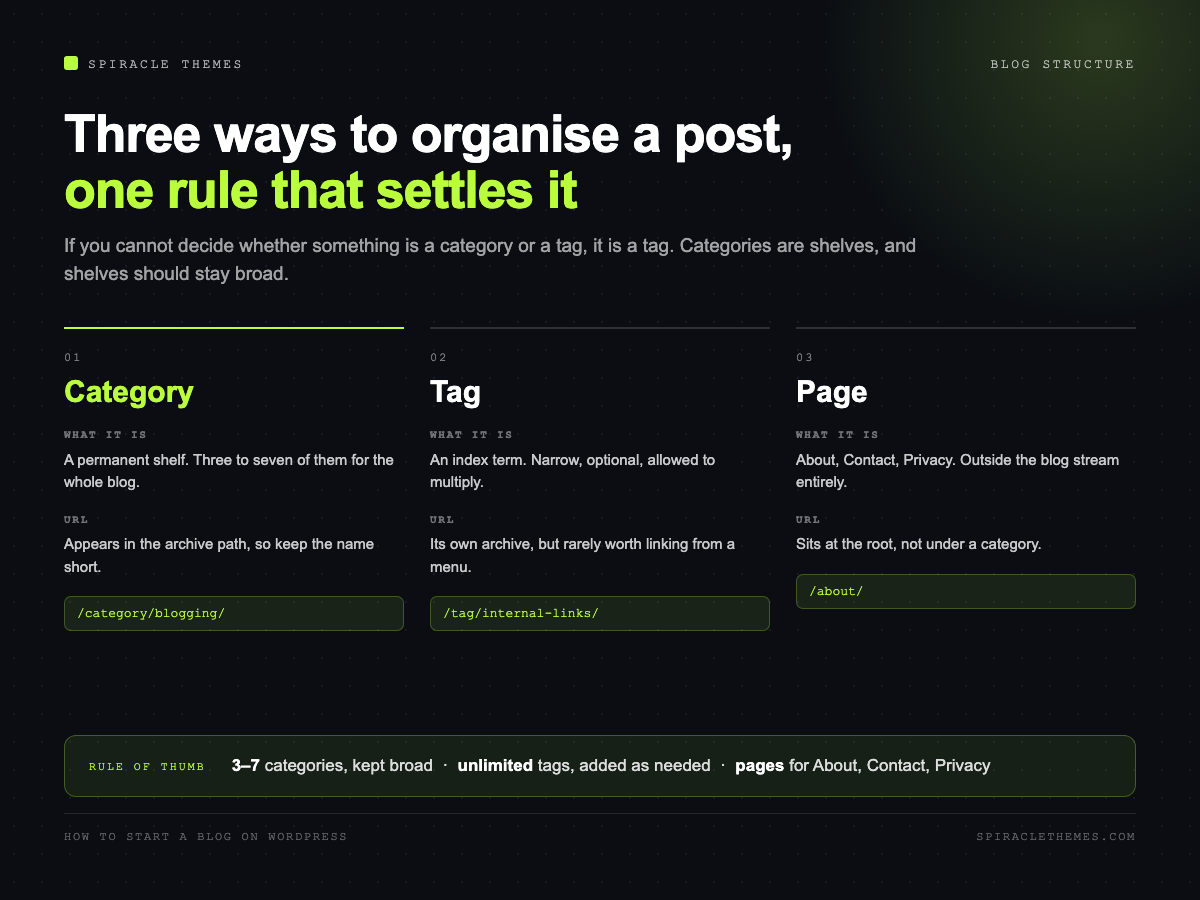
This is where most new blogs create a mess they cannot clean up later. The rule that works:
- Categories are shelves. Three to seven of them, broad, permanent. A reader should be able to guess which one a post belongs to from the post title.
- Tags are index terms. Optional, narrower, and allowed to multiply. If you are unsure whether something is a category or a tag, it is a tag.
- A page is not a post. About, Contact and Privacy are pages: they live outside the blog stream and outside categories.
Delete the default “Uncategorized” only after you have moved its posts elsewhere — WordPress will not let you delete a category that still has content, which is its way of stopping you from orphaning posts.
Step 3: write the first post properly
A blog post that ranks has a predictable shape, and it is not a secret formula — it is the shape that lets a reader decide in three seconds whether to keep reading, and lets a search engine understand what the page is about.
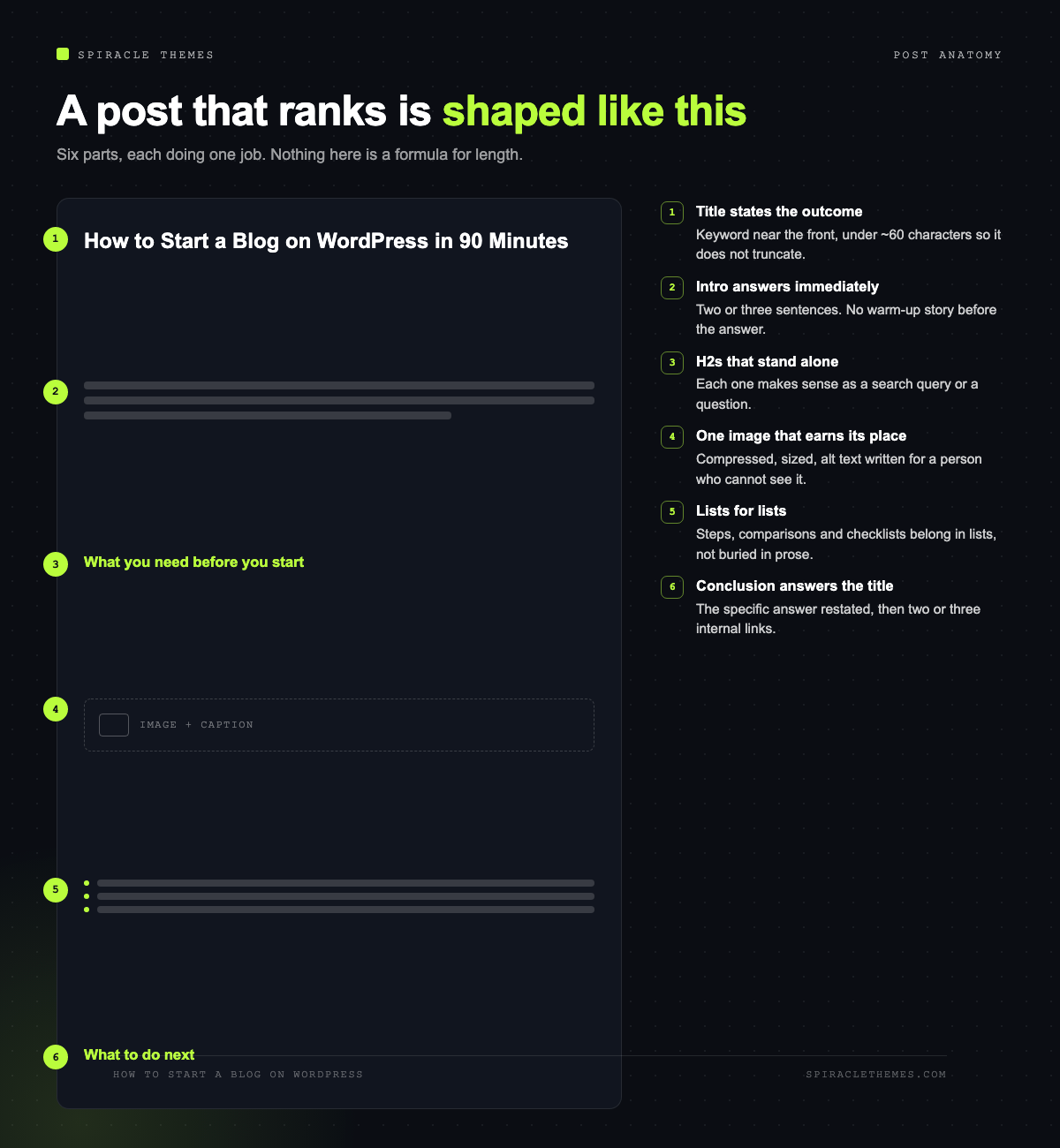
The parts that carry the most weight:
- A title that states the outcome. “How to Start a Blog on WordPress in 90 Minutes” beats “My Blogging Journey”. Put the main keyword near the front, keep it under about 60 characters so it does not truncate in results.
- An intro that answers the question immediately. Two or three sentences. The old advice to warm up with a story is what makes people bounce; if the reader has to scroll to find the answer, they leave.
- H2s that could stand alone. Each one should make sense as a search query or a question, because that is how people scan and how Google builds jump links.
- One idea per paragraph. Three or four sentences maximum on mobile.
- A list or table where a list or table is clearer. Steps, comparisons and checklists belong in lists. Prose that contains a list is a list that has been hidden.
- A conclusion that answers the title. Not a summary of what you just wrote — the specific answer, restated.
Step 4: the publishing rhythm
The single most common failure is publishing eleven posts in week one and then nothing for four months. Search engines reward steady output and readers reward predictability. A schedule you can sustain beats a sprint you cannot.

One post a week for twelve weeks is 12–18,000 words of content, which is a real blog. Two a month is a real blog. Daily for a fortnight followed by silence is not.
Where the posts come from: keep a running note of questions people ask you. Every question is a post title, and questions that real people ask are the ones with search demand behind them.
Step 5: the technical bits people skip
- Images. Compress before upload and size them to what the page needs — a 4000px photo displayed at 800px costs the reader four times the data for no visible benefit. WordPress generates the smaller sizes automatically if you upload a reasonable original.
- Alt text. Describe the image for someone who cannot see it. It is an accessibility requirement first and an image-search signal second.
- Featured image. Set one per post: it is what social platforms and most themes use for previews.
- Fonts. One family, two weights. The four ways to load them, and why self-hosting wins, are in how to import Google Fonts.
- Speed. The numbers that matter are Core Web Vitals: Largest Contentful Paint under 2.5 seconds, Interaction to Next Paint under 200 milliseconds, Cumulative Layout Shift under 0.1. A caching plugin and reasonably sized images get most blogs there.
Step 6: SEO, and the myths worth ignoring
WordPress handles the technical foundation: clean permalinks, sitemaps, canonical tags, RSS. What is left is choices about content and links. It is worth knowing what Google actually says, because the blogging niche is full of confident claims that its own documentation contradicts.
| Common claim | What Google’s documentation says |
|---|---|
| “Posts must be 2,000+ words to rank” | “The length of the content alone doesn’t matter for ranking purposes (there’s no magical word count target, minimum or maximum).” |
| “Use exactly one H2 per 300 words” | “There’s also no magical, ideal amount of headings a given page should have.” |
| “E-E-A-T is a ranking factor” | “Thinking E-E-A-T is a ranking factor? No, it’s not.” |
| “Keyword density must hit 2%” | Write naturally and vary the words; repetition is what gets punished, not under-use. |
That does not mean writing short, unedited posts and hoping. It means the proxy metrics people obsess over are not the mechanism. The mechanism is the obvious one: content written by someone who knows the subject, that answers a specific question completely, and that other pages on the site link to.
Three things do move the needle for a new blog:
- Internal links. Every new post should link to two or three older posts and be linked from at least one. That is how a blog becomes a site rather than a pile of pages.
- Descriptive URLs and titles. Both are read by humans in the results page before anything else is clicked.
- Submitting your sitemap once. In Google Search Console, add the property and submit
/sitemap_index.xml. Then leave it alone; re-submitting daily does nothing.
Step 7: the first month of traffic, realistically
A new blog gets almost no organic traffic in month one, and that is normal rather than a failure. What you can do in that month is make the site easy to index and prove that it is alive:
- Publish four to six posts before you tell anyone the blog exists.
- Link every post from the blog index and from at least one other post.
- Submit the sitemap, verify the property in Search Console, and check the Pages report for “Discovered – currently not indexed” entries after a fortnight.
- Share posts where your readers already are. For most niches that is one community and one newsletter, not five social networks.
Mistakes specific to a brand-new blog
| Mistake | Why it hurts | Do this instead |
|---|---|---|
| Leaving the default category | Every URL contains /uncategorized/ | Create categories before the first post |
| Publishing 10 posts in week one | Nothing left for week two | One post a week, banked two in advance |
| No featured images | Blank previews on social and archives | Set one per post, 1200×630 |
| Changing permalinks after launch | Every indexed URL breaks | Set “Post name” before publishing |
| Noindex left on | Zero traffic, site looks fine | Check Settings → Reading at launch |
| Writing for yourself, not a question | No search demand to capture | One post per real question asked |
Frequently asked questions
How much does it cost to start a blog on WordPress?
US$60–150 a year for a domain and hosting, and nothing for the software. Themes and plugins can add cost, but a blog does not need a paid theme to start.
Do I need a plugin to blog?
No. WordPress publishes posts natively. The two plugins worth adding early are a caching plugin and an SEO plugin; everything else can wait until a specific problem appears.
Should I use categories or tags?
Categories for the shelves (three to seven), tags for the index terms. If you cannot decide, tag it.
How long should a blog post be?
As long as the question requires. Google states plainly that length alone is not a ranking factor, so a complete 800-word answer beats a padded 2,000-word one — and a genuinely complex topic may need 3,000.
How often should I publish?
As often as you can sustain for six months. Weekly is the most common answer that people actually keep.
Can I change my theme later?
Yes. Posts, pages and media live in the database, so a theme change does not delete content. You will need to re-check menus, widgets and any layout blocks specific to the old theme.
What to do next
If the install is done and the settings are not, work through just installed WordPress, now what. If you are still choosing between a hosted blog and a self-hosted one, that comparison is in WordPress.com versus WordPress.org. And if the site is going to matter to a business, the ten failures worth avoiding are in common WordPress mistakes.
