LawFiz One Pro — Supercharge Your Law Website
Get the LawFiz One Pro Addon to unlock premium demos, advanced features, sticky headers, and more
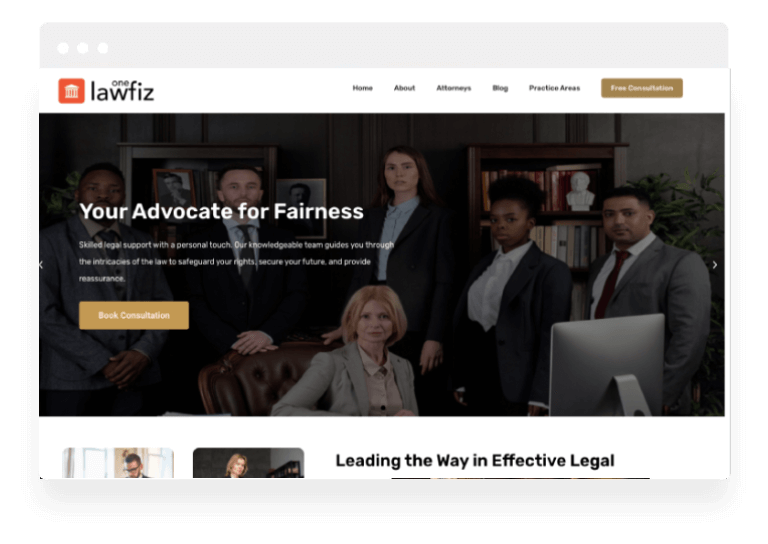
Premium Demos Included
Import any of these professional designs with a single click.
Why Go Pro?
Compare the features side-by-side. Upgrade to unlock the full potential of your store.
| Features |
Free Theme
Basic Usage
|
Pro Addons Bundle
Full Power
RECOMMENDED
|
|---|---|---|
| Core & Design | ||
|
Favicon, Logo, Title and Customization
|
||
|
Customizer Theme Options
|
||
|
Contact Form
|
||
|
Color Settings
|
||
|
Footer Widget
|
||
|
1 Click Demo Import
|
||
|
Breadcrumb Display
|
||
|
Elementor Page Builder
|
||
|
2 Header Styles
|
||
|
Inner Pages Settings
|
||
|
Blog Sidebar
|
||
|
Preloader
|
||
|
Responsive Design (Mobile, Tablets)
|
||
|
Sidebar Options (Full, Left and Right)
|
||
|
Top Social Icons
|
||
|
800+ Google Fonts Settings
|
||
|
Slider for Homepage
|
||
|
Typography
|
||
|
Footer Credits Editor
|
||
|
Extra Blog Settings
|
||
|
WooCommerce Ready
|
||
|
WooCommerce Settings
|
||
|
Extra Customizer Settings
|
||
|
Menu Cart
|
||
|
Sticky Header
|
||
|
More Color Options
|
||
|
Author Section for Single Post
|
||
|
Related Posts Section
|
||
|
Footer Columns Settings
|
||
|
Extra Premium Demos
|
||
|
Priority Support
|
||
| Support & Updates | ||
|
Support Forum Access
|
Community | Priority Ticket |
|
Updates
|
Limited | Automatic (1 Year) |
| Download Free | Upgrade to Pro | |
Upgrade to Pro
One low price unlocks every current pro addons plugins and future pro addons plugins across all themes. Use on up to 3 websites. 14-Day Money Back Guarantee — see details.
Unlock every current and future pro addons plugins and themes for one low price. See Pro Options →
Frequently asked questions
How is LawFiz One different from LawFiz?
Both themes share the same base, so pages, menus and practice-area structure carry over between them. They differ in demo direction and header treatment, and each add-on unlocks the feature set for its own theme.
Do I need both LawFiz add-ons?
No. Install the add-on that matches the theme you run. The Pro bundle covers every current and future theme and add-on, so buying it once removes the choice entirely.
Which typography and social controls come with LawFiz One Pro?
Top social icons, 800+ Google font settings, typography controls and footer column settings. Priority support and extra premium demos are part of the same licence.
Does LawFiz One Pro work with WooCommerce?
The add-on adds WooCommerce readiness, WooCommerce settings and a menu cart. The free theme is aimed at law practices and professional services rather than stores, so the shop layer is opt-in.
What the LawFiz One Pro add-ons include
LawFiz One is the second LawFiz demo, built on the same foundation with a different hero treatment. Because the structure is shared, the Pro bundle is identical: homepage slider, 800+ Google Fonts, typography panel, top bar social icons, footer credit editor and extra blog settings.
That has one practical consequence worth stating plainly. If you are choosing between LawFiz and LawFiz One, the decision should be made on which hero and layout you prefer, not on features — the add-ons do the same thing on both, and moving between them later does not mean rebuilding pages or menus.
As with the other legal themes, font control and the footer credit editor are the parts firms actually use; the slider is the part they use once and forget. Compare both on the LawFiz One free theme page.