

Bounce rate is the most misread number in analytics, because the name survived a change in definition. In Universal Analytics it meant “left without interacting”. In GA4 it means the opposite of engagement, and engagement has a specific, testable definition.
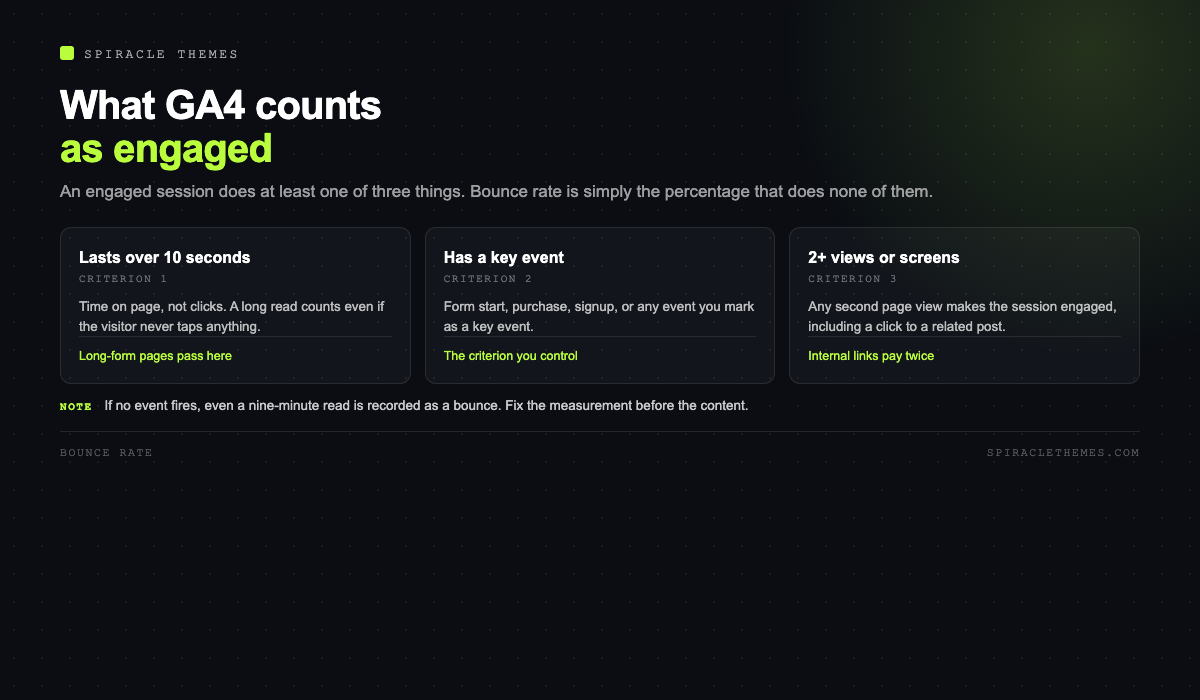
From Google’s own documentation: an engaged session lasts longer than ten seconds, or has a key event, or has two or more page or screen views. The bounce rate is the percentage of sessions that were not engaged. That single sentence changes what “reduce bounce rate” should mean.
What the number is actually telling you
| Observed | Likely cause | First thing to check |
|---|---|---|
| 85 to 100 percent on a single-page site | No event fires, so no session can be engaged | Scroll depth or interaction event |
| High on all traffic, including direct | Page loads slowly or looks wrong on mobile | LCP and INP on a phone |
| High on paid traffic only | Ad promise does not match the landing page | Ad copy against the H1 |
| High on blog, low on product pages | Readers find the answer and leave, which is correct | Whether the page answered the query |
| Suddenly higher after a redesign | Navigation or layout change, or a tracking change | Deploy dates versus the chart |
Two of those five rows are not problems. A reader who arrives from search, reads the answer for four minutes and closes the tab is a success, and if nothing on the page fires an event, GA4 records a bounce. Fixing that is a tracking fix, not a content fix.
Fix the measurement before the metric
If a site has no engagement events, every visitor is technically a bounce. Before optimising anything, make sure at least these exist:
- A scroll event at 50 or 75 percent, so long reads register as engaged.
- An outbound click event, so clicks to a partner or a booking system count.
- A form start event, not just a submission.
- Video play events, if the page has video above the fold.
GA4 also has enhanced measurement, which tracks scrolls and outbound clicks without extra code once enabled. Check that it is on before concluding that visitors are uninterested.
The levers that genuinely move it
1. Match the landing page to the promise
Most high bounce rates start before the page loads: the search result, ad or social post promised something the page does not deliver in the first screen. Fixing that is copy work, and it usually produces the largest single change.
2. Make the first screen answer the question
A visitor decides in a few seconds whether they are in the right place. A clear H1, a one-sentence confirmation, and the next step visible without scrolling does more than any popup. Popups in particular increase bounce on mobile, where the close button is often the hardest thing to hit.
3. Fix speed where it is actually slow
If time to first byte is above 0.8 seconds, the visitor is waiting on the server before anything renders. If the largest contentful paint is above 2.5 seconds, the page looks broken while it loads. Both are measured in the field, on real phones, not in a lab run on a laptop.
4. Give the reader somewhere to go next
Three contextual links inside the body outperform a “related posts” grid at the bottom, because they arrive while the reader is still interested. Link to the next question the reader will have, not to your newest post.
5. Remove friction that is not earning its place
Interstitials, autoplaying audio, cookie walls that reappear, chat widgets that cover the content on mobile. Each is a small tax and together they are the difference between a page that feels considered and one that feels hostile.
What bounce rate should be
There is no universal target, and anyone quoting one is guessing. Comparable benchmarks are within your own site over time, or within your own industry segment. A support article that answers a question in one screen can bounce at 80 percent and be a perfect page; a pricing page that bounces at 80 percent is leaking revenue.
A more useful pairing is bounce rate with conversion or key event rate. If bounce is high and the key event still fires, the page is doing its job. If bounce is low because everything fires an event but nothing converts, engagement is being measured, not created.
A two-week plan
- Segment the last 28 days by landing page and by device, and list the ten pages with the worst combination of high sessions and high bounce.
- Check those pages on a real phone, on mobile data, and time how long until the main content appears.
- Rewrite the first screen of the three worst offenders so the H1 matches the query and the next step is visible.
- Add the missing engagement events, and wait a week before comparing numbers.
- Re-check the same ten pages; anything that did not move had a traffic problem, not a page problem.
Segment before you judge
An unsegmented bounce rate is an average of behaviours that have nothing in common. Four segments make the number actionable:
| Segment | What it reveals | What to do with it |
|---|---|---|
| Device | Whether the phone layout is the problem | Test that page on a real phone before editing content |
| Channel | Whether the promise matched the source | Rewrite the ad or the landing page, whichever lied |
| Landing page | Which pages fail to hold attention | Work on the three worst by sessions, not by rate |
| New versus returning | Whether the page serves first-time intent | Add orientation for new visitors, depth for returning ones |
The trap is sorting by bounce rate alone: a page with twelve sessions and a 100 percent bounce rate outranks a page with nine thousand sessions and 70 percent. Sort by sessions first, then look at engagement within that list.
What “good” looks like for different page types
Judging every page against one target produces bad decisions. A rough guide, to be replaced by your own history as soon as you have three months of it:
- Support and how-to articles: high bounce is normal and usually means the answer worked. Check for a support-ticket deflection instead.
- Product pages: bounce should be low and add-to-cart high; a high bounce here is a pricing, photography or trust problem.
- Pricing pages: low bounce and low conversion is worse than high bounce, because the visitor stayed and still did not act.
- Blog index: expect a bounce, treat it as a routing page, and measure clicks into articles instead.
When a page’s engagement is high and its conversion is zero, the problem is the offer, not the bounce rate. That distinction saves a lot of pointless copywriting.
The source mismatch, which is not a page problem
Half the high bounce rates I have looked at were caused before the visitor arrived. The search result, the ad or the social post promised one thing, and the page delivered another. Three versions of the same failure:
- Wrong intent. The query asks “how much does it cost” and the page is a sales pitch with no numbers. The visitor leaves to find the number.
- Wrong audience. The ad targets beginners and the landing page assumes a developer. Nothing on the page is wrong, it is simply addressed to someone else.
- Wrong geography or language. The visitor wanted a local provider and the page describes a global service, or the reverse.
These are fixed in the title tag and the first paragraph, not in the body. If the page’s H1 restates the promise of the query in the visitor’s own words, the bounce rate usually falls without any other change.
The page experience details people skip
Beyond speed and copy, four small things show up repeatedly in session recordings of pages that fail to hold attention:
- The first screen has no next step. A headline and a hero image, then nothing to click. Visitors scroll looking for a reason to stay and find none.
- The navigation competes with the content. A mega menu that opens on hover, a sticky bar on mobile, a chat bubble over the text. Each one is a small exit.
- The form is above the answer. Asking for an email before delivering anything works on landing pages with a strong offer and fails everywhere else.
- The page ends without direction. No related link, no next article, no contact. The visitor who wanted more has to go back to search, and usually does not come back.
None of these require a redesign. They require someone to open the page on a phone, scroll it once, and ask what a stranger would do next.
Related reading: most bounce problems start in the first two seconds, which is a speed question covered in why WordPress sites are slow, and a layout question covered in why a mobile friendly site matters.
FAQ
Is a high bounce rate bad for SEO?
Not directly. Google does not use GA4 bounce rate as a ranking factor. What matters is whether the page satisfies the query, which shows up in other ways: returning visitors, branded searches and genuine engagement.
Why is my bounce rate exactly 100 percent?
Almost always because no engagement event fires, or because the tracking tag is only on one page. Check the event stream in real time before changing any content.
Does a long page reduce bounce?
Only if people scroll it. Length without structure gives a visitor more to skip. Subheadings, short paragraphs and a clear next step matter more than word count.
Should I use exit rate instead?
They answer different questions. Bounce describes a session with no engagement; exit rate describes the last page in a session. For diagnosing a single page, look at both next to the page’s own key event rate.
Do popups really hurt?
On mobile, intrusive interstitials hurt both the experience and, when they cover the main content on arrival, search visibility. A newsletter box inside the article is a different thing from a full-screen overlay before the first paragraph.
The short version: make the page load fast, make the first screen match the promise, give the reader a next step, and make sure your events can actually see engagement. The percentage will follow, and where it does not, the number was measuring the wrong visitor in the first place.
