

“WordPress is better” is usually argued as a matter of taste. It is not. The comparison can be reduced to six things you can measure or test yourself: how much of the web runs it, whether you can leave with your data, what you can extend without permission, where you can host it, what it costs as you grow, and who fixes it at 2am. Everything else, the dashboards and the drag-and-drop builders, is presentation.
Here are the six reasons, with the numbers that support them and the honest counter-arguments that usually get left out.
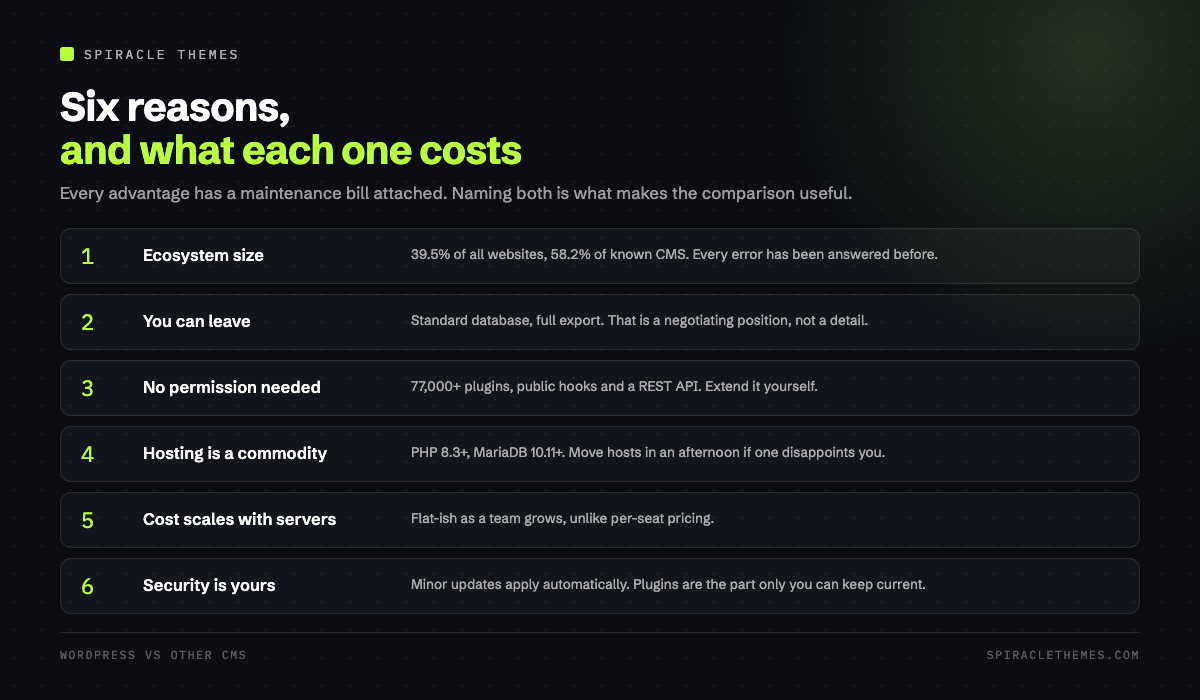
1. The size of the ecosystem is the actual feature
WordPress runs 39.5 percent of all websites and 58.2 percent of all websites whose content management system is known, according to W3Techs. That is not a popularity contest, it is a practical advantage with three effects:
- Every problem has been solved before. A search for an error message returns twenty forum threads, not two.
- Hiring is possible. A WordPress developer is a job title. A developer for a small proprietary CMS is a consultant who may not exist next year.
- Hosting is competitive. Because everyone needs the same stack, hosts compete on price and performance for it. Niche CMS platforms usually mean one host, one price.
2. You can leave, and that changes the negotiation
WordPress ships with a full export of posts, pages, comments and media, and the database is standard MySQL. Any developer can read it. That matters less on day one and far more in year four, when a vendor raises prices or a platform changes direction.
Proprietary platforms vary: some export only the rendered HTML, some export content but not design, some export nothing usable. The test is simple, and worth running before you commit to any CMS: export the site today and try to import it somewhere else. If the answer is “only with a paid migration service”, you do not own the site, you rent it.
| Question | Self-hosted WordPress | Typical hosted CMS |
|---|---|---|
| Who owns the database | You | The platform |
| Can you move host | Any host, same files | Usually locked |
| Can you add a feature | Install, or write a plugin | Wait for the roadmap |
| Who handles updates | You, or a care plan | The platform |
| Cost model | Hosting plus plugins | Per seat, per site, per feature |
3. Extending it does not require permission
The plugin directory lists over 77,000 free plugins, and the architecture is the reason: actions, filters, custom post types and the REST API are public contracts. If a plugin does not do what you need, a developer writes forty lines against those contracts instead of filing a feature request.
The trade is real. A plugin economy with no gatekeeper means quality varies enormously, and every plugin you install is code you now maintain. The discipline that separates a fast WordPress site from a slow one is usually plugin count, not the CMS.
4. Hosting is a commodity, so performance is a choice
Because WordPress has documented requirements, PHP 8.3 or newer, MariaDB 10.11 or newer, HTTPS, and hundreds of hosts implement them, you can move a site in an afternoon if a host disappoints you. That mobility is what keeps prices honest.
The flip side: performance is not automatic. A cheap shared host with no page cache will produce a time to first byte well above the 0.8 second mark that web.dev describes as the target, no matter what CMS you run. On a platform you cannot change the server; on WordPress you can change hosts, PHP version and cache layer independently.
5. The cost curve behaves differently as you grow
Hosted platforms tend to price per seat, per site or per feature tier. WordPress prices by server resources. For a five-person content team writing daily, the WordPress bill is roughly constant; the per-seat bill is not. For a small brochure site, the hosted platform may genuinely be cheaper and better supported, and pretending otherwise helps nobody.
The honest crossover is usually when you need any of: custom post types, memberships, WooCommerce, multilingual content, or integration with a system that is not on the platform’s list.
6. Security is your job, which is better than it being nobody’s
The most common criticism of WordPress is security. The accurate version: the core is maintained by a large security team and updates automatically for minor and security releases, while plugins and themes are third-party code that only you can keep current. A site that has not updated a plugin in two years is not a WordPress problem, it is a maintenance problem. That is precisely what monthly maintenance plans exist to solve, and why the update question is worth asking of any platform, not just this one.
The reasons WordPress is not better, in fairness
| Weakness | What it looks like | What it actually costs |
|---|---|---|
| Maintenance burden | Updates, backups, staging | Two to four hours a month, or a plan |
| Plugin quality | Abandoned plugins, conflicts | Audit before install, not after |
| Performance by default | Heavy themes, no cache | Caching, image discipline, a decent host |
| Security surface | Every plugin is an entry point | Fewer plugins, timely updates, 2FA |
If the site is a five-page brochure that will never change, a managed platform is a defensible choice. If it is a business asset that will grow, be edited by non-developers, and outlive the person who built it, the six points above are the argument.
How to test the claim yourself
- Export your current site’s content and try to import it into a clean WordPress install. Time it.
- Ask your host what PHP version you are on and how to change it.
- List the plugins you would need, and check each one’s last-updated date in the directory.
- Load the site on a throttled mobile connection and look at the largest element on screen.
None of that requires an opinion about which platform is nicer to use. It just tells you which one you can move, fix and afford in three years.
What switching platforms actually costs
Comparisons usually stop at the licence price, which is the smallest number involved. The real cost of a move has four parts:
- Content migration. Text moves easily, layouts do not. Pages built in one builder rarely import into another, so a fifty-page site typically becomes a rebuild of the ten pages that earn.
- Redirects. Every URL that changes needs a map, or the traffic you had disappears into 404s. On a site with years of posts, this is a day of work, not an hour.
- Retraining. Editors who knew the old interface need a new one, and the first month produces the mistakes that the old system prevented.
- The frozen features. Whatever the old platform did well, and the new one does not, becomes a custom build or a compromise.
Against that, the value of being able to leave later is real but hard to put on a spreadsheet. The useful question is not “what does the move cost” but “what does staying cost if the platform changes direction”. For a brochure site, staying is often right. For a business whose site is a lead engine, paying the migration now is usually cheaper than paying it in three years with more content to move.
Where WordPress wins outright, and where it does not
| Site type | WordPress | Why |
|---|---|---|
| Publisher or blog | Clear win | Taxonomies, feeds, editorial workflow, plugins for everything |
| Local business | Clear win | Local schema, booking plugins, multilingual, low cost |
| WooCommerce store | Win with care | Full control, but performance and maintenance become real jobs |
| Marketing landing pages | Contested | Hosted builders are faster to ship and harder to outgrow badly |
| Docs portal | Contested | Static generators do this better until you need search and auth |
| Web app | Not the tool | Use a framework; WordPress is a content system |
Those last three rows are where the honest comparison lives. WordPress is the right answer more often than any competitor, and it is not the right answer for everything, which is why the argument for it should be specific rather than tribal.
Related reading: the maintenance burden described above is what a monthly WordPress maintenance routine exists to cover, and the real cost of running the site is broken down in what a WordPress website costs.
FAQ
Is WordPress actually free?
The software is free and always will be, licensed under the GPL. You pay for hosting, a domain, and any premium plugins or themes. A working business site typically costs less per month than a single seat on a mid-tier hosted platform.
Is WordPress secure enough for a business site?
Yes, with the same caveats as any server you control: timely updates, least-privilege accounts, two-factor authentication for administrators, and a backup you have actually restored. Most incidents come from an outdated plugin or a weak administrator password, not from the core.
Do I need to know how to code?
No, for building pages and publishing. Yes, if you want a custom feature that no plugin provides. The middle path is hiring the custom work once and maintaining the rest yourself.
Will WordPress be slower than a hosted platform?
Not inherently. A cached WordPress site on modern PHP with properly sized images is fast. An uncached one on a weak shared host is not, and the difference is configuration, not the CMS.
Can I move to WordPress later if I start elsewhere?
Usually yes, and the migration is easier when the current platform exports content in a standard format. Check the export before you sign up, not after two years of publishing.
The practical conclusion: choose WordPress when you want to own the asset and can accept the maintenance that comes with ownership. Choose a hosted platform when you want someone else to carry that burden and the site is unlikely to need anything custom.
