

A domain and a hosting account are two separate purchases from two separate companies, and most of the confusion in this area comes from one sentence: the domain is your address, hosting is the land the building sits on. You can change the land without changing the address, and that is the whole point of keeping them separate.
This is the order that avoids the expensive mistakes: domain first, hosting second, then connect them with nameservers, then install WordPress. Skipping to “install” before the first three are settled is how people end up with a site on a temporary address, a domain locked inside someone else’s account, and email that stops working the day they move.
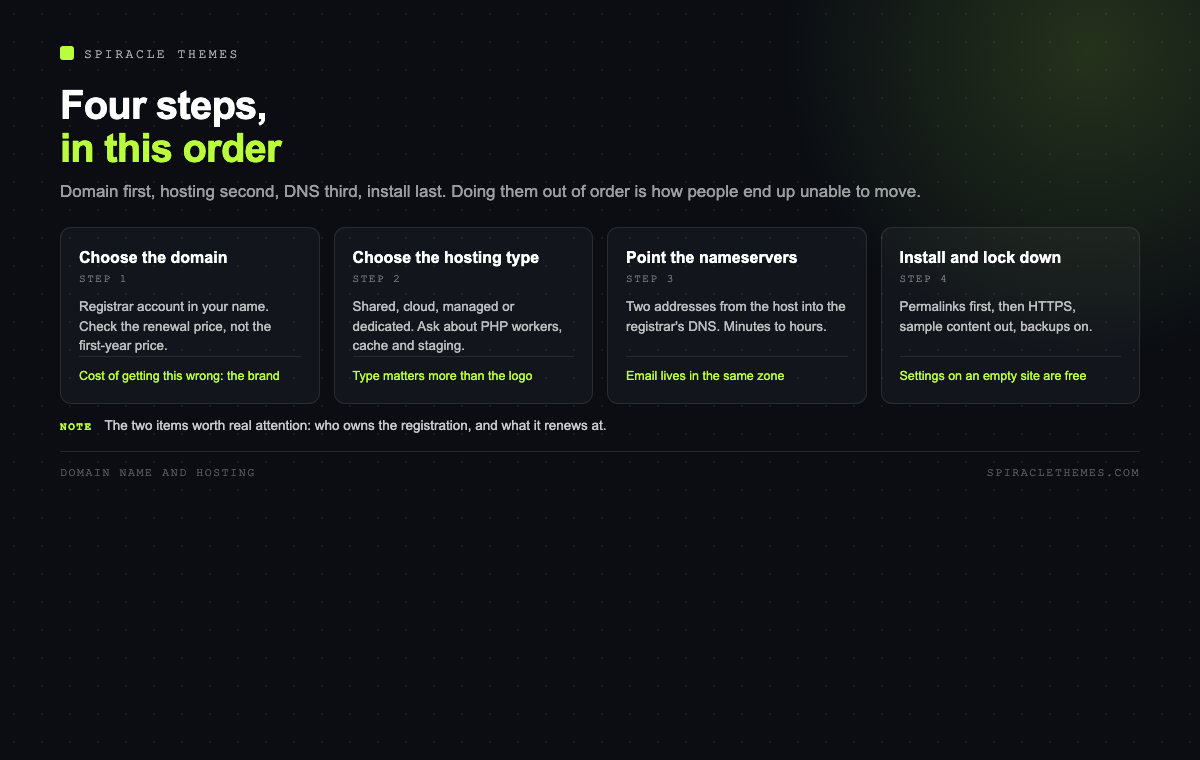
Step 1: choose the domain name
Three decisions hide inside “choose a name”: the word, the extension, and the registrar.
The word. Short, unambiguous when spoken aloud, and not a misspelling of a competitor. Avoid hyphens and numbers if you plan to say it on a call or a podcast. If the exact match is taken, a modifier that describes the business is better than an invented spelling that nobody can type.
The extension. .com remains the default for commercial sites because it is what people type when they are not sure. Country extensions signal local presence and can help a local business, but they also signal “we only serve this country”. Newer extensions are fine when the name is the brand and the audience arrives from search or social rather than the address bar.
The registrar. A registrar sells the registration; a host often resells one. Buying the domain from your host is convenient, and it is also how people end up unable to move: the domain is held inside an account they no longer control. A separate registrar account, in your name, with your email, is the safer default. Look at the renewal price, not the first-year price, before you buy, because the first year is the discount and the renewal is the actual cost.
| Item | What to check | Why it matters later |
|---|---|---|
| Registrar account | Registered in your name, your email | Recovery if the host disappears |
| Renewal price | Second year and beyond | The first year is marketing |
| WHOIS privacy | Included or paid | Keeps your address off public lists |
| Transfer lock | You control the lock | Prevents silent transfers |
| Auto-renew | On, with a card that works | A lapsed domain loses the brand |
Step 2: choose the hosting, not the host
Hosting plans are usually sold by brand and only loosely by what the server actually is. The type matters more than the logo:
| Type | What you get | Good for | Watch out for |
|---|---|---|---|
| Shared | One server, many sites, fixed PHP workers | First site, low traffic | Neighbours, CPU limits, no staging |
| Cloud or VPS | Guaranteed resources, root or panel | Growing traffic, WooCommerce | You become the sysadmin |
| Managed WordPress | Updates, cache, staging, support | Business sites with no in-house dev | Higher price, fewer plugin freedoms |
| Dedicated | Whole machine | Very high traffic or compliance | Cost, and real operational work |
WordPress itself asks for very little, and the numbers are published rather than folklore. WordPress.org’s own requirements page says a host should support PHP 8.3 or greater, MariaDB 10.11 or greater or MySQL 8.0 or greater, and HTTPS. That page also notes the legacy floor still runs — PHP 7.4+ and MySQL 5.5.5+ — while pointing out those branches are past end of life and “may expose your site to security vulnerabilities”. If a host quotes you PHP 7.4 as a feature in 2026, that is the whole conversation.
The differences between hosts that meet those requirements are cache quality, PHP worker count, disk speed, backup policy and support depth. Ask about those five things specifically, because “unlimited” in a hosting advert usually refers to disk space you will never fill, not to the resource that limits you. Two follow-ups worth sending in writing: how many PHP workers does this plan get, and does that number change at renewal, and can I restore yesterday’s backup myself, or do I open a ticket. A host that answers both in one reply is a host that has been asked before.
Step 3: connect them with nameservers
The domain has to be told where the website lives, and the two ways to do that are not equivalent. You are choosing who owns the DNS zone, and that choice decides how much work a future migration costs.
Host-held DNS or registrar-held DNS
Point the nameservers at the host. Your host gives you two or more addresses such as ns1 and ns2, you paste them into the registrar’s nameserver settings, and the whole zone — website, mail, everything — now lives at the host. This is the fastest path and the one every host’s onboarding email describes. The cost is that every future DNS change goes through the host’s panel, and leaving the host means moving the entire zone.
Keep the DNS at the registrar and change individual records. The nameservers stay pointed at the registrar’s DNS service, and you edit only the A record (or CNAME) for the website. Mail, verification tokens and everything else stays exactly where it is. It takes one more step at setup and saves an afternoon every time you move.
Either works. What you should not do is drift into the first option by default and then discover it during a migration, at the moment when DNS mistakes are most expensive. Write down which option you chose, and where the login lives.
The records that matter
If you keep DNS at the registrar, these are the records you will actually touch. Values come from your host; the description is what each one is for.
| Record | What it does | What breaks if it is wrong |
|---|---|---|
| A | Points the hostname at an IPv4 address | The domain loads nothing, or the old site |
| AAAA | Same, for IPv6 | Silent failures on some networks only |
| CNAME | Aliases one hostname to another, usually www | www and non-www serve different sites |
| MX | Tells the world where your email is delivered | Mail stops, or lands in an old provider |
| TXT (SPF) | Lists servers allowed to send as your domain | Mail is marked spam or rejected |
| TXT (DKIM) | Carries the public key that signs your mail | Authentication fails, deliverability drops |
| TXT (DMARC) | Tells receivers what to do when SPF/DKIM fail | No reports, no protection against spoofing |
The single most common self-inflicted outage in this whole process is moving the A record and taking the MX records with it. If your email lives somewhere other than your web host — a business mailbox, Google Workspace, Zoho — copy the MX values down before you touch anything, and check them again after.
Email on the same domain
Two rules, both enforceable by the receiving mail server rather than by goodwill.
The first: publish SPF and DKIM. Google’s email sender guidelines have required authentication from every sender since 1 February 2024 — “all email senders who send email to Gmail accounts must meet the requirements in this section”, with SPF or DKIM at the top of the list. Senders above 5,000 messages a day to Gmail addresses have to publish DMARC as well. A contact form that emails you from your own domain is a sender, so this applies to a five-page brochure site too.
The second: know who owns the mailbox. “Email included” can mean a real mailbox on the host’s server, or a forwarding rule that drops mail into a free inbox. Forwarding has a specific failure mode — the forwarded copy keeps the original sender’s address but arrives from your forwarding server, an IP that sender never authorised, so SPF fails at the destination and the message increasingly lands in spam. If a business address matters, buy a real mailbox, and keep its DNS records in the same zone you just documented.
Verify propagation before you panic
DNS changes are cached, so a change that looks broken is usually an old record on your own machine. Check from the outside before you file a ticket:
dig +short example.com A
dig +short example.com MX
dig +short example.com TXT
dig example.com NS
If dig returns the new value but your browser still shows the old site, the problem is local: your resolver, your browser’s DNS cache, or a hosts entry. Test on mobile data, which uses a different resolver entirely. Propagation normally completes in minutes and occasionally takes hours, and lowering the TTL to five minutes a day before a planned move is the difference between a fast cutover and an evening of refreshing.
Step 4: install WordPress and turn on HTTPS
A one-click installer is fine. What matters is what happens in the first ten minutes after: set the site title and tagline, set permalinks to post name, force HTTPS, install an SSL certificate if the host has not already, and delete the sample content.
If permalinks are still on the plain query-string format, every URL you publish has to be redirected later. Changing them on an empty site costs one click; changing them on a site with fifty posts costs a redirect map and a nervous afternoon. Do it first.
On HTTPS: certificates from Let’s Encrypt are free and every reputable host issues and renews them automatically. The detail that catches people during a move is that the certificate has to be issued on the new server before the DNS switch, or visitors get a browser warning in the gap between the two.
Step 5: the settings people forget
- Disable directory listing and file editing in the config file, if the host does not.
- Create a second administrator with a different email, so a lockout is recoverable.
- Set up automatic backups to a remote destination, not the same disk.
- Add the site to a monitoring service so downtime is noticed by something other than a customer.
- Point the DNS for www at the same place, and pick one canonical version.
What this costs, honestly
Prices change constantly, so the useful skill is knowing which line items exist rather than memorising numbers. Six of them, and only two are the ones people budget for:
| Line item | How it is billed | The trap |
|---|---|---|
| Domain | Yearly, smallest in year one | Renewal at several times the intro price |
| Hosting | Monthly or yearly | Yearly price is a commitment, not a discount |
| SSL | Free from Let’s Encrypt | Being sold a certificate you already have |
| Per user, per month | A free mailbox on a business domain | |
| Backups | Included, or an add-on | Stored on the same disk as the site |
| CDN | Free tier, then usage | Paying twice for caching the host already does |
The trap to avoid is buying the cheapest first-year bundle: domain, hosting and a theme for a low monthly figure that renews at three times the price, with the domain registered in the host’s name. It is not a scam, but it is a lock-in, and the exit costs more than the saving.
Checklist before you pay
- Registrar account created in your name, not the host’s.
- Renewal prices written down for domain and hosting.
- PHP version confirmed as 8.3 or newer, and changeable.
- Staging environment available, or a plan for testing updates.
- Backups included, and restorable without a support ticket.
- Email decided: host, or a separate provider with DNS access.
- Nameservers documented somewhere other than an email inbox.
If you already bought the wrong bundle
Most people read this after the purchase, not before. The recovery path depends on one question: whose name is on the domain registration?
Your name, host’s account. Ask the host for the authorisation code (EPP) and unlock the domain, then transfer to a registrar you control.
The host’s name. This is the difficult case. The domain may be part of a package they own, and leaving can mean buying it from them or starting again with a new name. Read the terms before arguing, and get any agreement in writing.
The host disappeared. The registrar of record still exists even if the host does not. Look up the domain with an RDAP or WHOIS tool, contact that registrar, and prove ownership with the account email on file.
Two things about the transfer itself are worth knowing before you start, because they are rules rather than opinions. Under the ICANN Transfer Policy, a registrar may deny a transfer requested within 60 days of the domain’s creation, or within 60 days of the last transfer — so a domain bought last month is simply not movable yet, whatever anyone tells you on chat. And once the request is in, the losing registrar has five calendar days to respond; silence counts as approval, so a host that “cannot find your ticket” cannot hold the domain indefinitely.
It also helps to know who counts as the decision maker. The same policy names the Registered Name Holder and the Administrative Contact as the only parties with authority to approve or deny a transfer, and states that the Registered Name Holder’s authority supersedes the Administrative Contact’s. If your name is on the registration, you are the one who decides. If it is not, no amount of email gets it back without the account holder’s cooperation.
On the hosting side, the exit is easier: files plus a database export, restored anywhere. That is the practical argument for keeping the two purchases separate, and it is worth the small extra effort in year one.
How to move hosts without downtime
The migration itself is a solved problem, and the sequence matters more than the tool:
- Build the new hosting account and install WordPress on a temporary domain or a hosts-file override.
- Copy the site with a migration plugin, or with a database dump plus an archive of wp-content.
- Test on the temporary address: homepage, a deep page, a form, a login, and the checkout if there is one.
- Lower the DNS TTL to five minutes a day before the switch, so propagation is fast.
- Point DNS at the new server, keep the old one running for a week, and watch the error logs on both.
- Cancel the old account only after the new one has served a full week of normal traffic.
Two details that catch people: email usually lives in the same DNS zone, so moving the website can move the mail if the MX records change with it; and the SSL certificate has to be issued on the new server before the switch, or visitors get a browser warning in the gap.
FAQ
Can I buy the domain from the same company as the hosting?
You can, and it is convenient. The risk is concentration: if the account is compromised or the host stops responding, you lose the address and the site together. If you do keep them together, make sure the registrant contact is your own email and that you know how to move the domain out.
Do I need a dedicated IP address?
Rarely. Modern hosting serves many sites from one address with SNI for SSL, and search engines do not penalise shared addresses. A dedicated IP matters for a few specific cases, such as some mail configurations or legacy client requirements.
What happens if I let the domain expire?
It usually enters a grace period where renewal is still possible at the normal price, then a redemption period where it costs considerably more, and then it is released publicly. Do not test this with a domain that carries your brand.
Is shared hosting enough to start?
For a brochure site or a new blog, yes. Move when you see consistent slow admin pages, CPU limit warnings, or a need for staging and object caching. Those are signals about resources, not about traffic numbers.
Should the domain include the keyword?
Only if it still reads like a brand. Exact-match domains carry no ranking advantage worth damaging a brand name for, and they age badly when the business changes direction.
Do I need to move the DNS to use a new host?
No. Pointing a single A record at the new server is enough, and it leaves mail and any other services untouched. Moving the nameservers moves the entire zone, which is why it is the faster option at setup and the riskier one later.
What should I do immediately after installing WordPress?
Permalinks, HTTPS, the second administrator and off-site backups — in that order. The settings that matter are the ones that are expensive to change later; the rest can wait. Our first-hour checklist after installing WordPress walks through them, and the concepts behind the two purchases are covered in domains and hosting explained.
Get the order right — domain, then hosting, then nameservers, then install — and the rest of the setup is configuration rather than repair. The two things worth spending real attention on are the registrar account and the renewal price, because both are much cheaper to get right now than to fix later. If you would rather have someone handle the move and the maintenance that follows, our WordPress care plans start at $99 a month.
